
Comparing The Best Document Data Extraction Software for Invoices
Here’s a quick comparison of the 6 best invoice extraction software solutions for accounting teams in 2026.
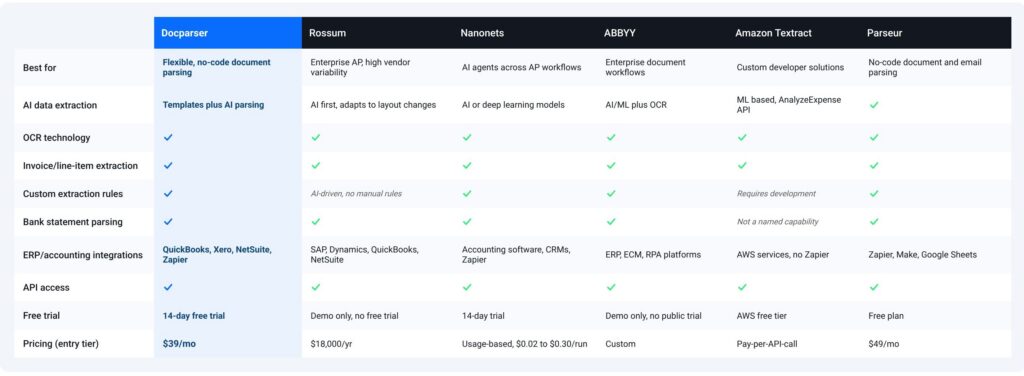
We evaluated each solution using the same criteria: OCR accuracy, AI-powered data extraction, line-item and table extraction, accounting integrations, API access, pricing, ease of setup, support for accounting workflows, and scalability.
1. Docparser
Docparser is an AI-powered document data extraction platform that helps businesses automatically extract structured data from invoices, bank statements, purchase orders, receipts, forms, and other business documents. By combining AI with customizable parsing rules, it gives accounting teams the flexibility to automate document processing while maintaining control over how data is extracted and validated.
Best for: Accounting teams and bookkeeping firms that want a predictable, controllable solution to automate invoice processing, bank statement parsing, and other document-based workflows without coding or relying entirely on AI.
Top features
- Access to a library of pre-built templates for accounting and bookkeeping teams.
- Build custom invoice parsers with a visual, rule-based editor that lets you define exactly which fields to extract from each invoice layout.
- And multiple advanced features to help you build the perfect document parser.
- Table and line-item extraction, with the option to edit the table structure for best results.
- AI-powered parsing capabilities that include: automating the rule creation process, resume parsing, receipt parsing, handwriting recognition, checkbox data extraction, and content summarization.
- Download data as a file in XLS, CSV, JSON, or XML format.
- Export data to accounting systems like QuickBooks, Xero, or NetSuite via our third-party integrations.
- REST API and webhook support for custom workflows.
- Cloud-based platform with secure document processing.
Limitations
- No on-premises deployment option for organizations with strict self-hosting requirements.
Key accounting use cases
While many of our users rely on Docparser for invoice data extraction, Docparser is also a popular choice for many other use cases, including bank statement parsing, lead management, bill of lading extraction, and more.
2. Rossum
Rossum is an AI-first document processing platform that uses AI models to extract data from invoices and feed it into accounting systems. Rather than configuring a template per vendor layout, Rossum’s engine is designed to adapt to changing invoice formats and continuously improve accuracy through human-in-the-loop validation.
Best for: Enterprise AP teams that want AI to handle vendor layout changes on its own, with human review as a backstop rather than the main workflow.
Top features
- AI-powered invoice data extraction.
- AI agents can follow standard operating procedures (SOPs) to interpret documents, perform calculations, send emails, and update enterprise systems.
- Adapts to layout changes.
- Datasets that can be used to identify missing data and fill in the gaps.
- Integrations that cover accounting and ERP platforms like SAP, Microsoft Dynamics, QuickBooks, and NetSuite.
- API and automation capabilities.
- Human-in-the-loop review for low-confidence extractions.
Limitations
- Pricing is more on the expensive side, with the Starter plan costing $18,000 annually (no monthly billing).
Key accounting use cases
Used when invoice formats change often and a human still needs to review lower-confidence extractions before they post.
3. Nanonets
Nanonets is an AI-driven document automation platform built on OCR and deep learning models. It processes unstructured documents (like invoices, receipts, purchase orders, contracts, and claims) and converts them into a structured output that can be integrated into accounting systems via APIs.
Best for: AP teams that want AI agents handling more of the process end to end, like reconciliation and supplier onboarding, not just data extraction.
Top features
- Custom model training and zone selection for tuning extraction to specific document types.
- AI agents for AP, reconciliation, order management, supplier onboarding, month-end closing, RCM, and data extraction.
- Line-item and table extraction.
- OCR for scanned documents.
- No-code workflow building alongside API access, making it usable by both non-developers and technical teams.
- API and integrations.
Limitations
- Pricing is usage-based per workflow “block run” rather than a flat per-document rate, which can make costs less predictable to forecast at scale.
- Not the ideal choice for smaller businesses that want a code-free solution.
Key accounting use cases
Used for automating steps beyond extraction, like month-end closing and RCM, where teams want the AI agents doing more of the workflow.
4. ABBYY FlexiCapture
ABBYY is an intelligent document processing (IDP) platform that uses AI, machine learning, and OCR technology to extract structured data from invoices, purchase orders, bank statements, and other business documents. Designed for enterprise environments, it helps organizations automate high-volume document processing across finance and other departments.
Best for: Large enterprises that need a highly configurable document processing platform for complex, high-volume workflows across multiple document types.
Top features
- AI-powered document classification and data extraction, with auto-training that improves on non-standard layouts over time.
- Configurable validation and verification workflows.
- Handles multi-page invoices with inconsistent columns and multi-line item descriptions.
- Integration with ERP, ECM, and RPA platforms.
- API and SDK for custom implementations.
- Available cloud or on-premise, which is useful if data residency is a requirement.
Limitations
- Requires implementation and configuration, making it better suited to enterprise IT environments than small businesses.
- May be more complex and resource-intensive than no-code, cloud document parsing solutions.
Key accounting use cases
Used for invoice processing alongside broader document management (contracts, forms) plus country-specific compliance validation. Common in banking, insurance, and government sectors.
5. Amazon Textract
Textract isn’t an accounting tool at all — it’s an AWS machine learning service. Feed it a document, and it returns text, layout, and structured data (including a dedicated AnalyzeExpense API for invoices and receipts) as raw JSON, ready for whatever you build on top of it.
Best for: Technical teams with the engineering resources to build a fully custom invoice pipeline inside an existing AWS setup, rather than adopt an off-the-shelf tool.
Top features
- Machine learning-based OCR.
- Form and table extraction.
- API-first architecture.
- Confidence scores on every extracted field, so you can route low-confidence results to human review automatically.
- AWS service integrations.
- Pay-per-use pricing that scales efficiently if you’re already running on AWS.
- Backed by AWS’s ongoing model improvements.
Limitations
- Does not provide an out-of-the-box, no-code, cloud document parsing interface.
- Requires development resources to build complete invoice processing workflows.
- No integrations with Zapier and similar platforms, so users have to use n8n or custom APIs.
Key accounting use cases
Used to build custom invoice and receipt processing pipelines within AWS. Common in tech companies and enterprises with in-house development teams rather than accounting departments directly.
6. Parseur
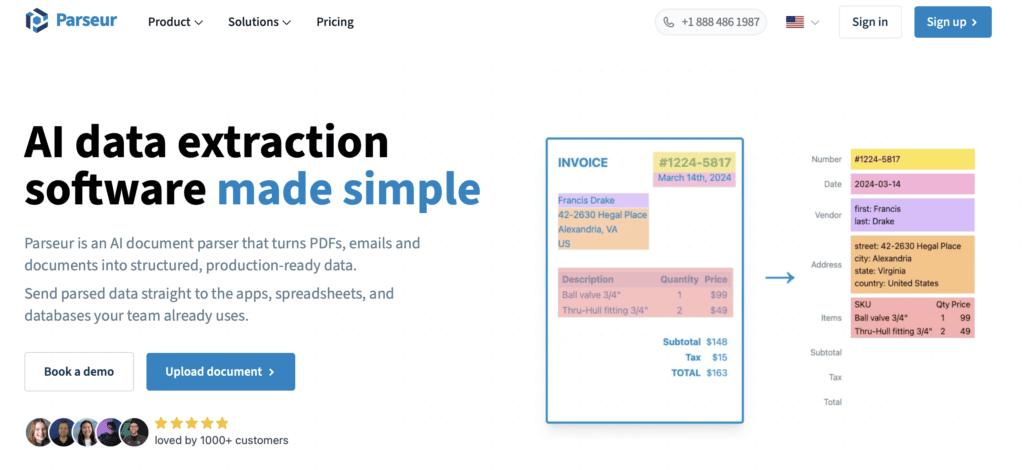
Parseur is a no-code document and email parsing platform that extracts structured data from invoices, emails, PDFs, and other business documents. It focuses on helping businesses automate repetitive data entry through integrations and workflow automation.
Best for: Teams whose invoices mostly arrive by email and want a fast, low-lift setup for that specific channel.
Top features
- No-code parsing templates.
- OCR support.
- AI-assisted extraction.
- Email parsing.
- Integrations with Zapier, Make, and Google Sheets.
- API access.
- Free tier available, so smaller teams can test before paying.
Limitations
- Less suited to teams receiving documents through channels other than email.
Key accounting use cases
Used for invoice processing via email intake from a stable set of vendors. Bank statement parsing is limited, since template-based handling can break when a bank changes layout.
Benefits of Choosing the Right Document Data Extraction Software
Automating invoice data entry, a huge bottleneck for accounting teams, provides several benefits in addition to saving hours of work every week: faster invoice lifecycles, fewer errors, scalability, early-payment discounts, and improved audit trails and bank reconciliation.
Faster invoice lifecycles
According to Ardent Partners’ State of ePayables 2025 report, the average cost to process a single invoice is $9.84, taking an average of 8.2 days. Best-in-Class AP teams — the top 20% of organizations by cost and cycle time — achieve per-invoice processing costs 79% lower and processing times 79% faster than their peers. This performance can only be accomplished via accounting automation.
Fewer errors
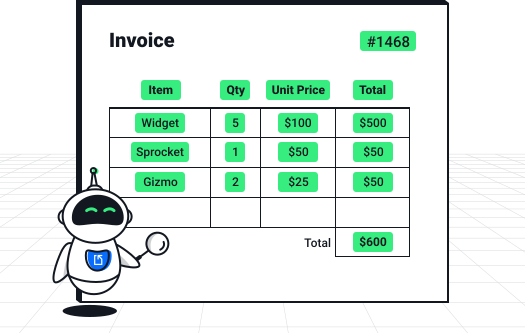
Manual data entry leads to errors like typos, incorrect numbers, missed line items, or a wrong vendor number. Data extraction captures invoice data from the source documents, preventing both human error and the extra work required to find and rectify errors.
Greater capacity without headcount
Accounting teams that use automation can handle a growing volume of invoices without having their workload increase proportionally. This means they don’t have to hire more staff or face stressful bottlenecks. This is particularly beneficial for bookkeeping firms that are expanding their client base.
Capture early-payment discounts
Faster invoice processing helps ensure invoices are approved and paid on time, making it easier to take advantage of supplier early-payment discounts and avoid late payment fees.
Improved audit trails and bank reconciliation
Extracted invoice data is stored in a structured, searchable format, making it easier to trace transactions, prepare for audits, and reconcile invoices with bank statements and accounting records.
How to measure ROI
If you take a little bit of time to measure the potential ROI of invoice extraction software, you will have a clearer idea of how much it will benefit your business. A simple way to do this is to calculate the monthly savings:
Monthly savings = (Invoices per month) × (Manual cost per invoice − Automated cost per invoice)
For a fuller picture, factor in the indirect savings that don’t show up in a simple per-invoice comparison: reduced rework from error correction, captured early-payment discounts, and staff hours redirected from data entry to higher-value work like exception review or analysis. These often add up to more than the direct per-invoice savings alone.
Frequently Asked Questions
What is document data extraction software?
Document data extraction software is software that uses technologies such as OCR technology, rule-based data extraction, and AI to identify and extract data fields in recurring business documents. Common examples include invoices, forms, resumes, receipts, and bills of lading, to mention a few. By using document data extraction software, employees can automate data entry to save time and export business data to spreadsheets, databases, and applications.
What is invoice extraction software?
Invoice extraction software is a software that automatically captures invoice data like invoice number, date, vendor name, line items, subtotal, total, etc. Accounting teams use it to automate data entry, minimize errors, and streamline invoice processing.
What is the best invoice extraction software for accounting teams?
The best invoice extraction software depends on the invoice volume, customizability, format variety, and integration with existing systems. For most accounting teams, Docparser is the best invoice extraction software because it combines AI-powered document data extraction, customizable invoice parsing rules, accounting integrations, and a no-code interface. Organizations with enterprise AP workflows may prefer Rossum, while developers building custom solutions may prefer Amazon Textract.
Can invoice extraction software process scanned invoices?
Yes, most modern solutions can extract data from scanned invoices, whether they’re in PDF or image format (scanned or photographed), using OCR and AI.
What’s the difference between Docparser and Rossum, ABBYY, Nanonets…?
These platforms all extract document data but target different use cases. Docparser emphasizes no-code customization and end-to-end workflow automation, while Rossum leans heavily towards AI/ML-driven extraction, ABBYY focuses on enterprise workflows with on-premise options, Nanonets on AI-powered automation, Amazon Textract on developers, and Parseur on email-based no-code parsing.
How much does document data extraction software cost?
Pricing varies by vendor and often follows a tiered subscription model, with the highest tiers offering custom pricing for enterprise-level needs. Docparser has a 14-day free trial that allows you to try all core features and decide if it’s the right fit for your business. Pricing starts at $39/month (or $32.5/month if billed annually) and gives you 100 parsing credits per month (one credit can parse a document with up to 5 pages).
In Conclusion
Manual invoice processing costs real time and money — in errors, late fees, and hours better spent elsewhere. The right document data extraction software closes that gap, and Docparser works whether you’re a small bookkeeping team or a larger finance department scaling up. It’s no-code and easy to set up, yet flexible enough to customize extraction rules exactly to your documents, and it integrates smoothly with the accounting systems you already use.
Rossum, ABBYY, Nanonets, Amazon Textract, and Parseur each fit narrower needs — high enterprise volume, custom engineering, or email-only intake. Docparser fits the widest range of accounting teams.
The best way to know if it works for you? Start your free 14-day trial (no credit card required) and test it on your own invoices.