
How to Manage and Organize Accounts Payable Invoices

Accounts payable departments play an important role in maintaining a company’s financial health. They make sure that invoices are paid on time, vendors are satisfied, and financial records are accurate and up-to-date. In reality though, this is often easier said than done. It’s not uncommon to run into issues such as late payments, inaccurate reporting, […]
How to Automate Sales Leads in Salesforce Using Docparser

Salesforce is the most popular CRM platform in the world, with over 150,000 users. It’s also one of our key integration partners — many of our customers use our native Salesforce integration to send data extracted from documents to their accounts. Since users can’t import lead data directly from, say, PDF files, Docparser acts as […]
Automate PDF to Oracle Extraction Without Coding
Many businesses use Oracle solutions to store and manage databases. But here’s where a problem may arise: how do you move data trapped in documents into your Oracle database in the first place? Whether you need to process invoices, financial reports, HR records, or any other document, the process of extracting PDF to Oracle traditionally […]
A Complete Guide to PDF to Microsoft Business Central
All sorts of organizations use Microsoft Business Central to manage operations, finances, sales, customer service, and more. This cloud-based, comprehensive business management solution is also used as an ERP system by thousands of businesses. In fact, Forbes named it the best ERP system in 2023. However, before you can use Business Central’s amazing features, sometimes […]
Easily Transfer and Extract PDF to SAP Using Docparser
Thousands of businesses worldwide use SAP solutions to streamline and manage their processes across different departments, from finance to HR, sales, IT, etc. If you work in one of these companies, then you must’ve had to deal with some data entry issues. Let’s face it: inputting information into a database is boring at best, and […]
Easily Extract Your Invoice to ERP With Docparser
To run their business, companies need suppliers of energy, telecommunications, goods, etc. So naturally, Accounts Payable departments receive a steady flow of invoices that they need to process. However, they often struggle with the painstaking process of entering invoice data into their ERP systems. When erp invoice processing takes a lot of time, AP teams […]
PDF to XML: How to Convert PDF to XML for Free
This post covers how to use Docparser for PDF to XML conversion. You’ll learn why converting PDF to XML is usually a challenging task and how easy it is to convert PDF to XML with Docparser. If you’re in business, there’s a good chance you deal with PDFs regularly. But what if you need to convert PDF […]
Use Zonal OCR to Extract Data From Scanned Documents

Zonal OCR, or Zonal Optical Character Recognition, also sometimes referred to as Template OCR, is a technology used to extract text located at a specific location inside a scanned document. This article will explain how Zonal OCR works and how it can automate data-entry workflows. Most of today’s document and PDF scanning offer out-of-the-box Optical Character Recognition (OCR) capabilities that convert your scanned […]
How to Convert PDF to CSV in Minutes
We all know how useful Excel is for handling day-to-day business tasks, but the CSV format is quite popular, since it lets you store tabular data related to customers, orders, and so on. As simple text files, CSV files are easy to create, edit, and share. However, there are times where table data is trapped […]
Introducing the Docparser Template Library & New Parsing Templates
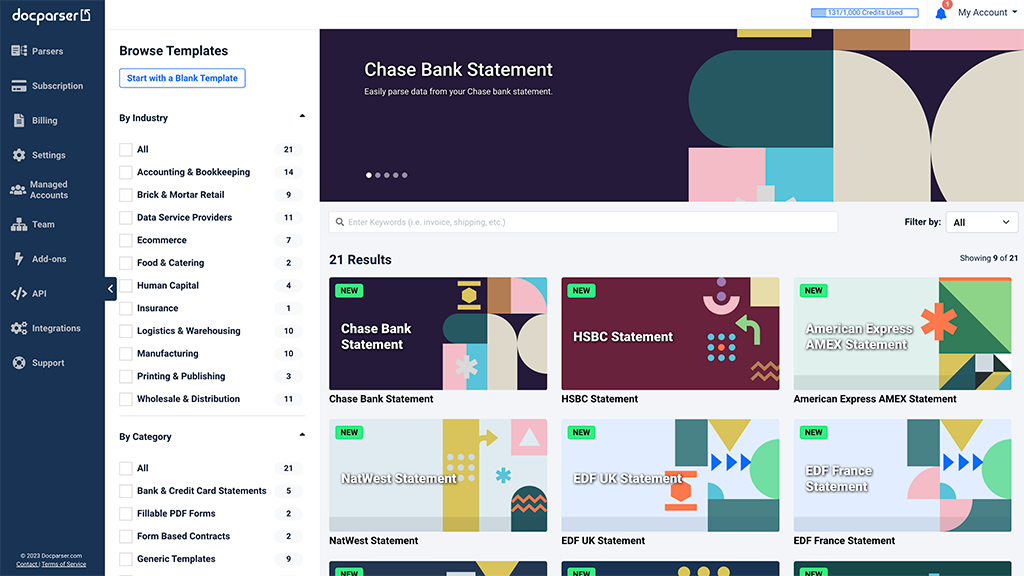
We are thrilled to unveil the new Docparser template library, designed to enhance your experience and cater to your evolving needs. Our revamped design and user interface are geared towards facilitating rapid expansion, enabling us to bring you a plethora of new parser templates. With this launch, we are also introducing several exciting new parser […]
