Automate Supplier Invoice Processing Without the Pitfalls

Last Updated: September 15, 2026
Supplier Invoice Processing

Table of Contents

Easily Extract Data From PDFs

Automate manual data entry tasks with Docparser

No credit card required

Most businesses handle supplier invoices regularly. When it’s not optimized for efficiency, supplier invoice processing can be a source of bottlenecks, stress, and unnecessary costs. Just imagine the pain of recording transactions manually, or facing vendors unhappy with payment delays.

If you’re turning to AP automation — specifically, invoice extraction — to overcome those issues, you’re on the right track. However, this can become its own problem when using an extraction tool that doesn’t deliver accurate results or fails to connect with your workflows. In this blog post, we go over how supplier invoice processing works, why invoice extraction breaks in some cases, and how to automate invoice processing successfully with Docparser.

Capture Key Data from Your Supplier Invoices Easily

Use Docparser to automate data entry, save time, and streamline your document-based workflows.

No credit card required.

What Is Supplier Invoice Processing?

Supplier invoice processing is the end-to-end workflow that businesses use to manage supplier invoices from receipt to data capture, validation, matching, approval, payment, and archiving.

A supplier invoice typically contains the following information:

  • Invoice number.
  • Invoice date.
  • Vendor details (name, address, email, phone).
  • Customer details (name, address, email, phone).
  • Description of goods or services.
  • Financial details (subtotal, taxes, discounts, total amount due).
  • Payment terms (due date, payment method).

The goal of this workflow is to ensure supplier invoices are processed correctly and efficiently before the Accounts Payable team pays them.

How Does Supplier Invoice Processing Work?

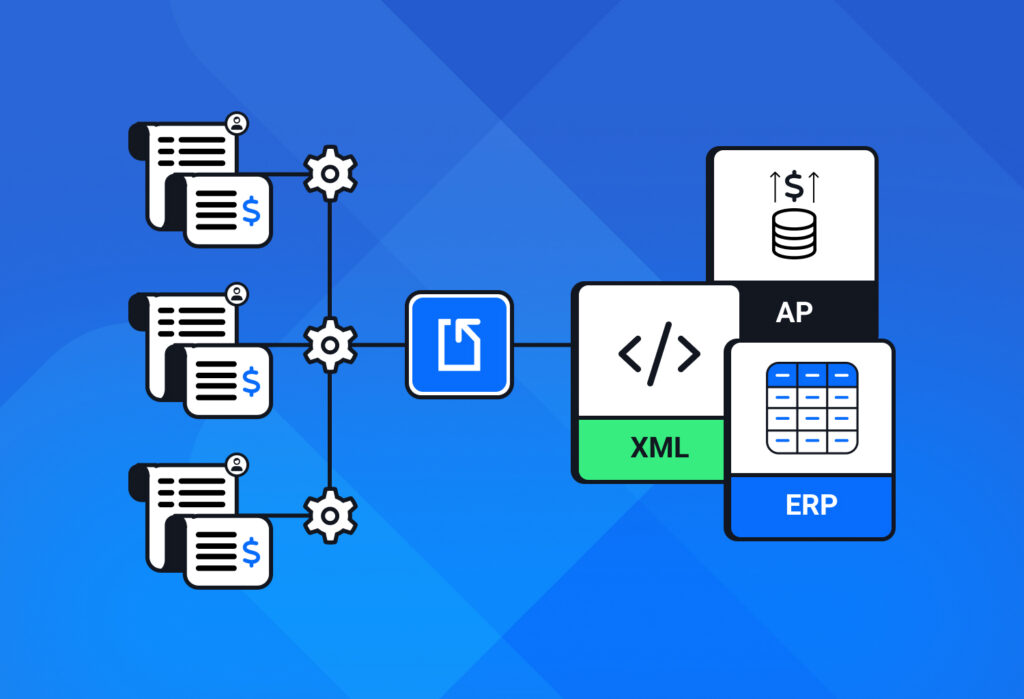
Supplier invoice processing typically follows these steps: the Accounts Payable team receives the invoice, then it captures the data, performs three-way matching, routes the invoice for approval, records the transaction to their accounting system or ERP, schedules payment, and archives the invoice.
Invoice Processing Automation

This workflow is also called the invoice-to-payment cycle. Let’s dig a little deeper into each step.

1. Receive supplier invoice

Upon delivering the goods or services to their client, the supplier sends them an invoice — either as a paper document or a digital one. Receiving the invoice kicks off processing.

2. Capture invoice data

Next, the information in invoices must be entered into an accounting system or ERP. Historically, AP teams perform this task manually (many still do), but modern technology can automate it with high precision, freeing employees from countless hours of tedious work.

3. Match against purchase orders and receipts

Here, the AP team matches the invoice against the corresponding purchase orders and receipts to find potential discrepancies and make sure the data is correct across all documents and records.

4. Route invoice data for approval

After validating the invoice, the AP employee routes it to an approver. The approver reviews the invoice and, if everything is in order, authorizes it for payment.

5. Export the invoice data to the accounting system 

The accounting team records the approved invoice in the accounting system or ERP, which generally updates the company’s financial records and accounts payable balance.

6. Pay the invoice

The AP team schedules and processes payment in accordance with the agreed-upon payment terms and schedule.

7. Archive the invoice

Lastly, the AP team archives the invoice and its related documents for future reference.

Traditionally, AP teams manage this workflow manually, but with modern technology, many tasks can be automated, allowing for more efficiency and less errors. To get a clearer idea of the benefits of automation, let’s compare manual and automated work.

Manual vs automated supplier invoice processing

Manual supplier invoice processing is costly to begin, and as the business grows, so does the volume of invoices to process, putting more pressure on the AP team.

Automated supplier invoice processing, on the other hand, handles most of the workflow and scales along with the business. This allows employees to focus on exceptions and other tasks that require human judgment.

Take a look at this table for a direct comparison of manual and automated supplier invoice processing:


Manual processing

Automated processing

Data entry

Employees enter invoice data manually

Software extracts invoice data automatically

Data errors

Frequent due to manual data entry; they lead to delays extra processing costs

Reduced to a minimal level that can easily be handled

Invoice cycle time

10+ days, potentially several weeks

2-5 days

Payment deadlines

Slow processing can lead to missing payment deadlines

Automated processing makes it easy to meet deadlines

Early payment discounts

Often missed due to long invoice cycles

Faster processing allows businesses to claim them

Scalability

Workload increases with invoice volume and may require hiring more staff

No increase in workload or headcount

So it’s no surprise that automated invoice processing helps businesses streamline invoice cycles, lower costs, and keep strong vendor relationships. Manual processing, on the other hand, holds back teams from working with maximum efficiency.

That said, accomplishing those results with AP automation can be challenging. Sometimes invoice data extraction breaks down due to certain pitfalls, creating new bottlenecks for AP teams.

Why Invoice Extraction Breaks in Accounting Teams

Invoice extraction breaks down when software cannot reliably interpret the documents it receives or connect the extracted data to the rest of the AP workflow. Common causes include poor document quality, inconsistent invoice layouts, complex tables, and disconnected accounting systems.

Poor document quality causes errors during extraction

If you receive scanned invoices in image or PDF format, you need a data extraction tool that can recognize information accurately even when the document quality isn’t perfect. This requires a strong OCR (Optical Character Recognition) engine. Otherwise, extracted data may not be accurate, which would require manual data entry — what you don’t want to do in the first place.

Invoices have different layouts and formats

Vendor invoices often come in an unstructured or semi-structured format, and may even have layout variations at times. The question then is whether the data capture tool used by the AP team is able to successfully extract each data field. recognize each field and turn invoices with different layouts into a consistent data format.

Complex tables and information that are difficult to parse

Data fields like invoice number and vendor details are easy to capture most of the time. However, sometimes invoices have line-item tables or other data fields that can be difficult to parse. When an extraction tool cannot correctly interpret these tables, it may place data in the wrong fields or miss information entirely, forcing you to rectify those inaccuracies manually. This is a common pitfall and is painful to fix.

Extraction doesn’t connect to the accounting workflow

Effective invoice parsing doesn’t end with data extraction. On the contrary, it’s essential to automate the next step: exporting the invoice data to your accounting platform or ERP, where new records are automatically created. Invoice processing isn’t truly automated until this part is handled without human intervention.

So if you use a tool that doesn’t connect to your accounting workflows, you’ll find yourself doing manual work to transfer the extracted data into your accounting system. This creates another bottleneck and limits the time and cost savings you expected from invoice processing automation.

The good news is you don’t have to fall into those pitfalls if you pick the right invoice parsing tool.

Capture Key Data from Your Supplier Invoices Easily

Use Docparser to automate data entry, save time, and streamline your document-based workflows.

No credit card required. 

How Docparser Fixes Invoice Extraction and Automates Your AP Workflow

Invoice data extraction and integration are essential to automating supplier invoice processing. Once your AP team starts capturing invoice data and adding it to their system automatically, they will effectively:

  1. Save countless hours of manual work.
  2. Prevent data entry errors.
  3. Automate subsequent steps: three-way matching, invoice routing and approval, payment scheduling.
  4. Pay vendor invoices on time and even claim early-payment discounts.
  5. Keep clear audit trails.

Our AI-powered document processing solution helps businesses every day capture data from business documents and move it to their systems to automate their workflows. In fact, many businesses use Docparser for invoice parsing.
Guide to Intelligent Document Automation

By using Docparser, your automated workflow will look like this:

  1. Upload supplier invoices to Docparser.
  2. Extract invoice data (using OCR, parsing rules, and AI parsing features).
  3. Export invoice data to your ERP or accounting system.
  4. Trigger the next steps in your AP workflow (3-way matching, routing for approval, handling exceptions, and so on).
  5. Schedule approved invoices for payment.

Setting up Docparser to start extracting data from your supplier invoices is going to take only a few minutes. To see how it works, watch this video:

You can get started with one sample invoice only (no need to train an AI model with an entire dataset), generate a set of parsing rules with our SmartAI Parser template, and edit them as much as needed. Plus, you can always reach out, and we’ll help you set up your perfect invoice parser.

Capture Key Data from Your Supplier Invoices Easily

Use Docparser to automate data entry, save time, and streamline your document-based workflows.

No credit card required. 

Frequently Asked Questions

What is a supplier invoice?

A supplier invoice (also called a vendor invoice) is a document issued by a supplier to request payment from the company that bought its products or services. It contains all the relevant information about the transaction, from the vendor details to the description of the goods or services purchased and the amounts due.

Supplier invoices are essential for accounting teams because they need them for recording and paying transactions, tax preparation, and auditing.

How can I prevent duplicate supplier invoices?

First, you should designate a single entry point for supplier invoices to avoid them being recorded (or worse, paid) more than once. Make sure to provide clear submission guidelines for vendors to prevent errors.

Next, your AP system must be able to automatically check supplier invoices before processing to detect duplicate or suspicious invoices and flag them for human review. You also need three-way matching to catch duplicates before they are approved. Additionally, you want to perform reconciliation and audits regularly.

How can I automate supplier invoice processing?

You can automate supplier invoice processing by using software to capture and extract invoice data, validate it, send it to your accounting system or ERP, and trigger subsequent tasks in your AP workflow. Automated tasks include three-way matching, flagging discrepancies, routing invoices for approval, and so on.

When does invoice extraction fail?

Invoice extraction can fail when documents are of low quality, tables are highly complex, or layouts are too inconsistent, making it difficult for extraction software to recognize and extract information. Furthermore, invoice extraction may also fail when the extraction tool isn’t properly configured to send data to the ERP or accounting system.

How does automated supplier invoice processing handle exceptions?

Automated supplier invoice processing handles exceptions by detecting issues (like duplicate invoices, erroneous amounts, and discrepancies with POs or receipts), then routing them to the appropriate person who will review them. Invoices without exceptions can continue through the automated workflow without interruption.

How can Docparser help me improve my AP workflows?

Docparser helps automate supplier invoice processing by extracting data from invoices and sending it to your accounting system or ERP. Once you set it to extract data from invoices and move it to your system, you can automate subsequent AP tasks such as three-way matching and routing.

In Conclusion

Maximizing the efficiency of supplier invoice processing is mandatory for any business, whether large or small. AP automation removes bottlenecks, reduces errors, and enhances visibility of spending.

Additionally, your AP team reclaims valuable time they can dedicate to more strategic initiatives. And your business maintains strong relationships with vendors.

Accomplishing this is extremely hard with manual invoice processing and becomes simply impossible when your business grows. This is why AP automation is considered a priority for many AP leaders.

The first and crucial step to automate supplier invoice processing is to extract invoice data reliably and move it to your system. Docparser is built to do this for you. Try it out today for free and automate your AP workflow without the pitfalls of invoice extraction.

Capture Key Data from Your Documents Easily

Use Docparser to automate data entry, save time, and streamline your document-based workflows.

No credit card required. 

You Might Also Like

Easily Extract Data From PDFs

Automate manual data entry tasks with Docparser

No credit card required